Externe Inhalte
An dieser Stelle findest du externe Inhalte von YouTube. Durch Klick auf “Externe Inhalte laden” erklärst du dich damit einverstanden, dass dir externe Inhalte angezeigt werden. Dabei werden personenbezogene Daten an die Drittplattform übermittelt.
Weitere Informationen findest du in unserer Datenschutzerklärung und der Datenschutzerklärung von YouTube.
Award winner 2026

Smart Accounting Software for Freelancers and Small Businesses

Manage invoices, expenses, and taxes easily. Ideal for freelancers and small business owners, including those exempt from VAT (like “Kleinunternehmer” according to German §19 UStG).
  • Stay focused on your work while sevdesk handles your bookkeeping
  • Collaborate with your tax advisor through secure digital access
  • Get a clear view on you finances anytime
More than 160,000 companies trust sevdesk

Everything you need to run your freelance finances

Being a freelancer means juggling projects, clients and finances at the same time.
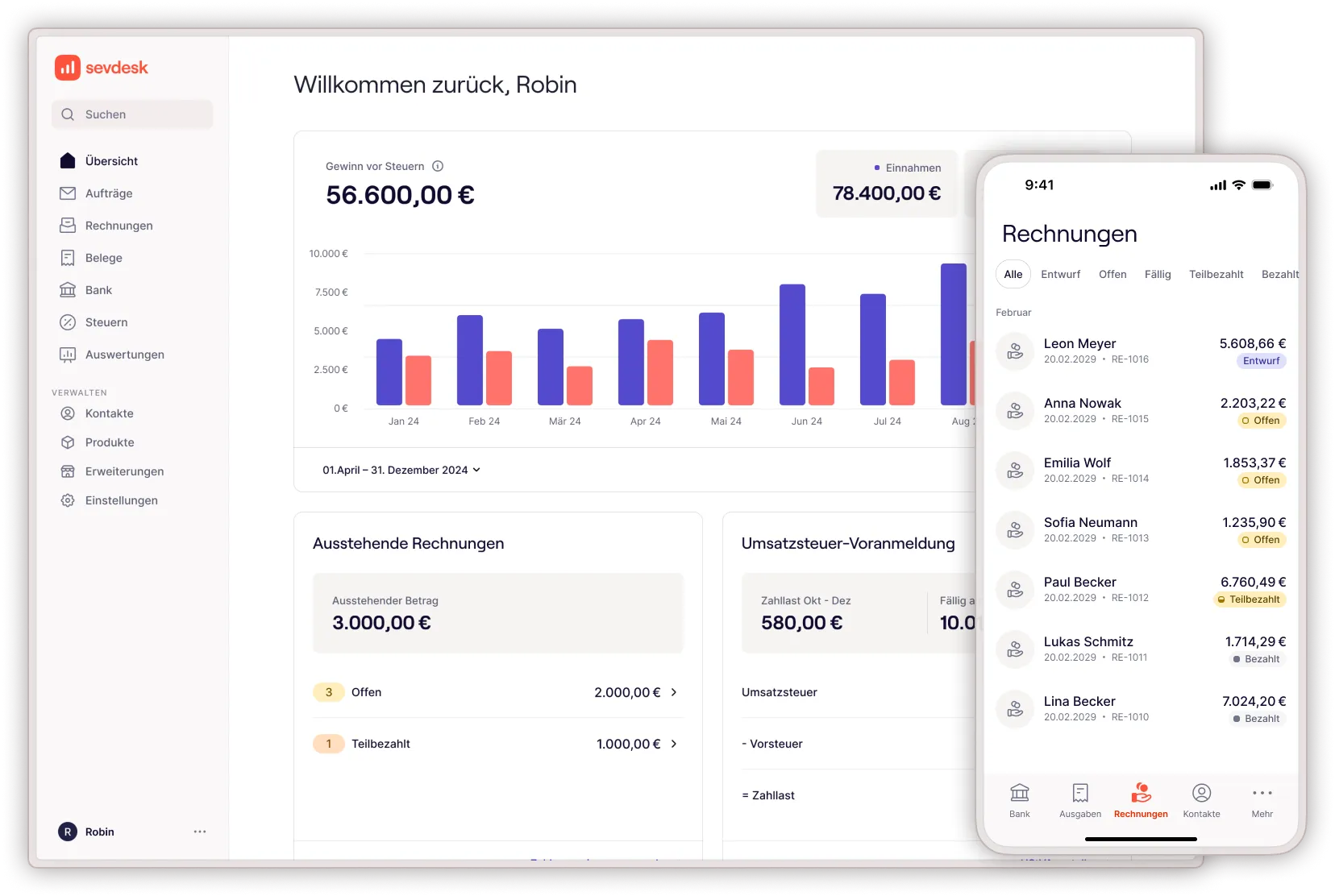
sevdesk gives you 100% clarity over your accounting with smart automation, an intuitive interface available in English and a mobile app that keeps you in control on the go. You always know where your business stands financially.

Create professional invoices in seconds

Design and send branded invoices that meet all German legal requirements. Of course, also in e-invoice formats.
Mehr zum Dashboard
→
→

Automate your bookkeeping

Incoming invoices are imported and stored digitally, ready for accounting. Easily upload receipts with the mobile app.
Mehr zu Rechnungen
→
→

Manage receipts digitally

Upload pictures of receipts, and sevdesk extracts all relevant information automatically. Keep your records tidy and audit-proof.
Mehr zu Belege
→
→

Get real-time financial overview

Dashboard insights show your current income, expenses and profit. Track your cash flow and prepare for tax time with confidence.
Mehr zu Online-Banking
→
→
How sevdesk simplifies your daily accounting tasks

Create (e-)invoices that get you paid faster

Create professional invoices in seconds that meet all German legal requirements including e-invoices. Choose from customizable templates, add your branding and send invoices directly to your clients via email or download them as PDF.
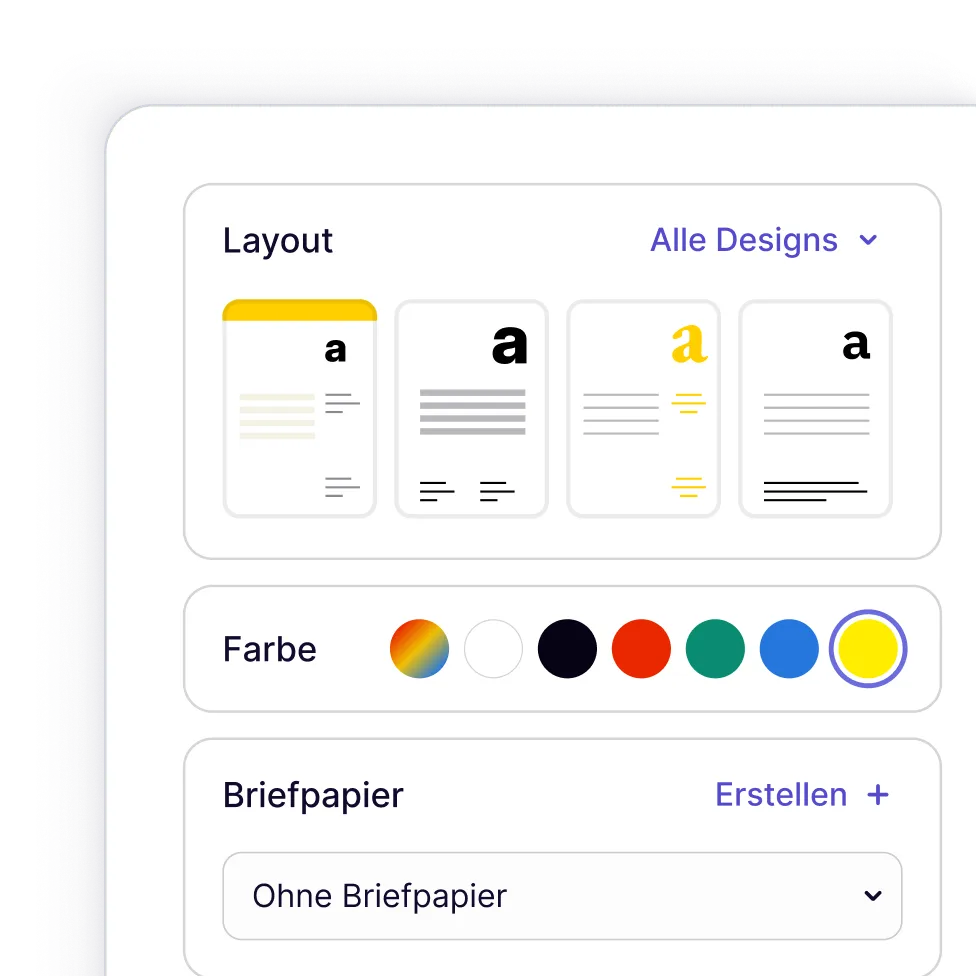
  • Automatic invoice numbering and archiving for audit-proof documentation
  • Support for recurring invoices to save time
  • Create invoices in English or any other language and choose between different currencies

Capture receipts and expenses effortlessly

Upload photos of receipts using your smartphone or email them directly to sevdesk. The built-in OCR technology extracts all relevant information automatically, so you never have to type in amounts or dates manually.

  • Store all documents digitally and access them anytime
  • Easily upload via mobile, drag & drop or e-mail
  • Assign receipts to projects or categories for better cost tracking

Automation that saves you hours every month

sevdesk takes care of repetitive accounting tasks in the background, so you can focus on your clients and projects. The system learns from your workflow and becomes smarter over time.
  • Convert accepted quotes into invoices instantly
  • Let automatic bank reconciliation match payments to your open invoices
  • Use smart, AI-powered categorization to organize your transactions in seconds

Ready to simplify your accounting?

Start your free trial today and experience how easy accounting in Germany can be.
No installation. No risk. Just results.
4,000+ bank integrations available

Banking integration for real-time financial clarity

Connect your business bank accounts directly to sevdesk and import transactions automatically. Every payment, transfer and expense appears in your dashboard, giving you a complete overview of your cash flow.
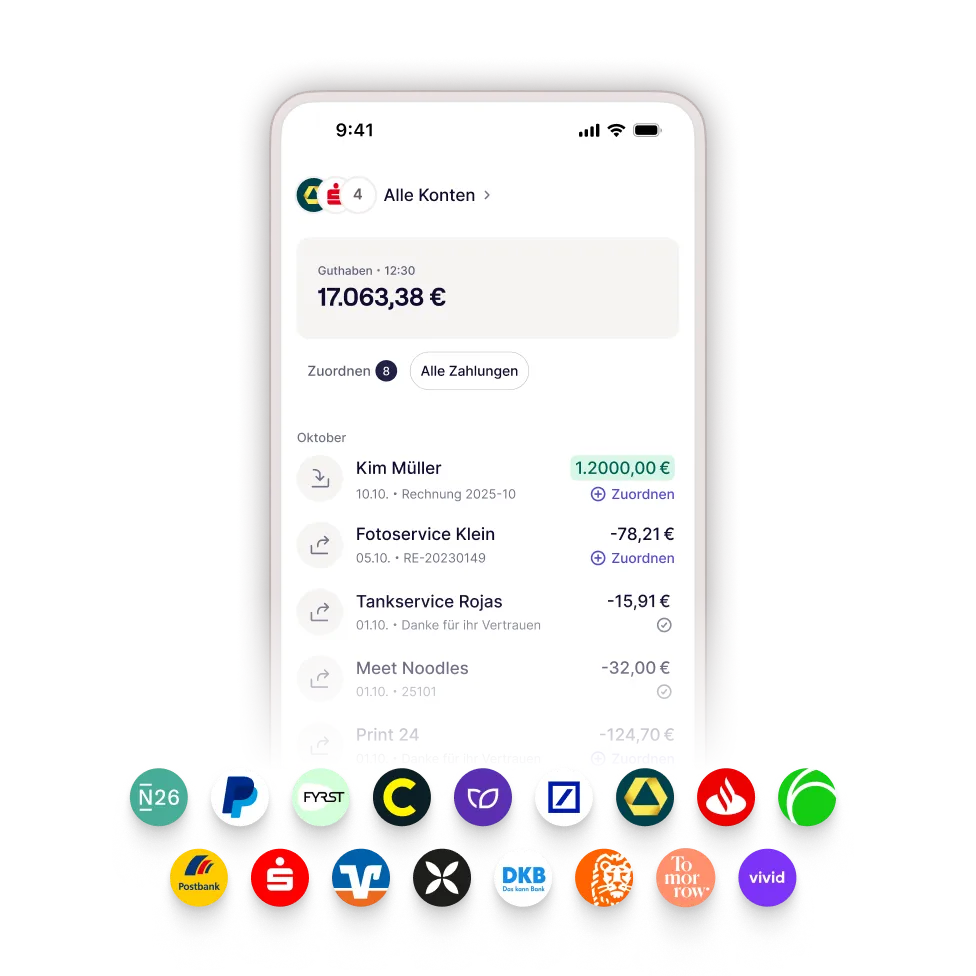
  • Sync multiple bank accounts and credit cards in one place
  • Match incoming payments to invoices with a single click
  • See your account balance and cash flow forecast in real time
No VAT? No problem!

Handle §19 UStG invoices automatically

Operating under the German Kleinunternehmerregelung means you're exempt from charging VAT. sevdesk automatically formats your invoices correctly and adapts your bookkeeping to match your tax status.
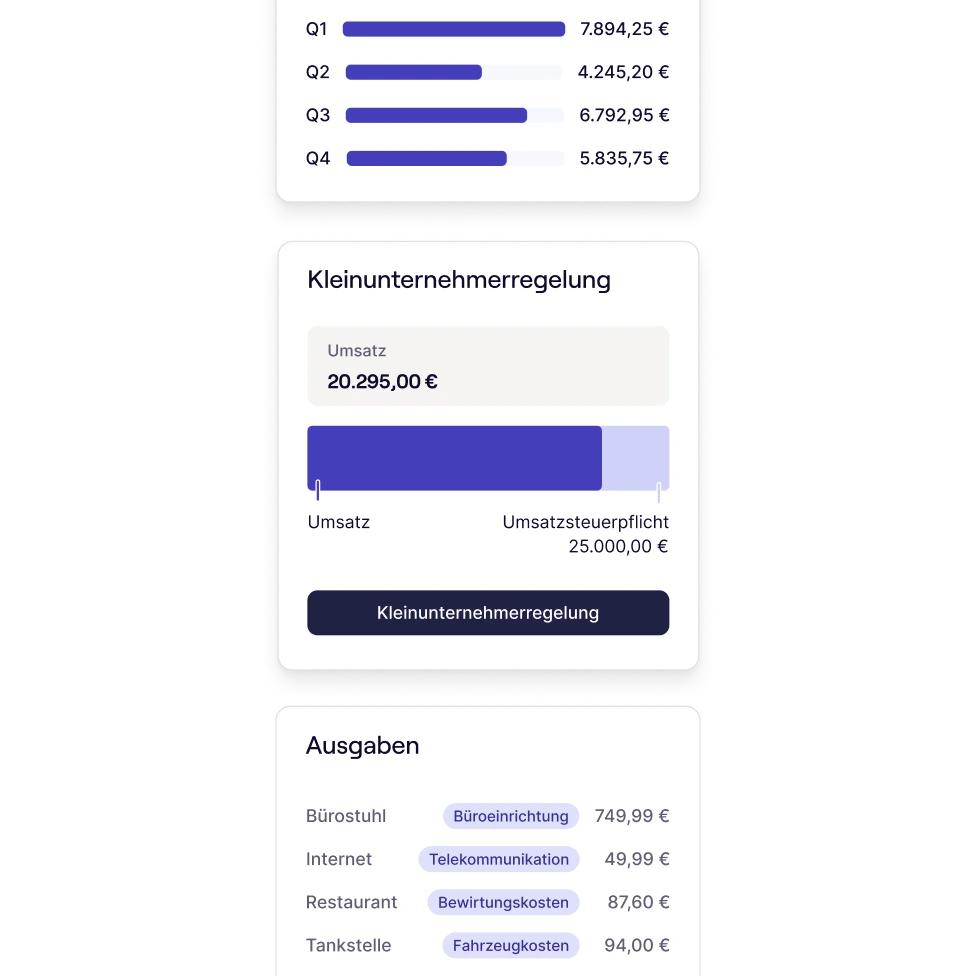
  • Create VAT-free invoices with the correct legal notice according to §19 UStG
  • Switch seamlessly to regular VAT accounting when your revenue exceeds the threshold
  • Track your annual revenue to know when you're approaching the limit

60+ integrations that fit your workflow

sevdesk connects seamlessly with the tools you already use. Sync payments from PayPal or SumUp, export your data to DATEV for your tax advisor or send invoices directly from your CRM or email client.
The open API also allows for custom workflows.

x
Salesforce Logo.
Deutsche Bank Logo.
Postbank Logo.
sevdesk Logo.
Shopify Logo.
P Logo.
sevdesk Logo.

Prepare your tax declaration with confidence

When tax season arrives, sevdesk has everything ready for you. Generate reports for your tax advisor, export data in DATEV format or simply hand over digital access so they can work directly in your account. Or do your taxes on your own!

  • Save preparation time with pre-filled income and expense summaries
  • Rely on automatic classification of your transactions according to German tax categories
  • Submit your VAT returns (UStVA) directly to the tax office –  no ELSTER certificate required
Create and export income statement EÜR in sevdesk

Who is sevdesk built for?

Whether you're just starting out or running an established freelance business, sevdesk grows with you and adapts to your needs. Here's how different types of freelancers benefit from our accounting software:


Starting your freelance business

You're in your first year of self-employment and need simple, compliant invoicing without prior accounting knowledge. sevdesk helps you set up your finances correctly from day one, whether you're using the §19 UStG small business regulation or standard VAT accounting.
Mehr zum Dashboard
→
→

Growing your client base

You're managing multiple projects, recurring invoices and increasing revenue. sevdesk scales with you through smart automation, bank reconciliation and expense tracking that keeps your finances organized as your business expands.
Mehr zu Rechnungen
→
→

International freelancers in Germany

You're working as a freelancer in Germany but prefer to manage your business in English. sevdesk offers a fully localized English interface while keeping you 100% compliant with German invoicing and tax requirements, so you can focus on your work, not on decoding bureaucracy.
Mehr zu Belege
→
→

Freelancers with tax advisors

You work closely with an accountant and need seamless data exchange. sevdesk offers DATEV export, shared account access for your tax advisor and pre-categorized transactions that make tax preparation faster and more accurate.
Mehr zu Online-Banking
→
→
Trusted by more than 160,000 companies
What our customers say
“Back in the day, we used to bring everything to our tax advisor in a shoebox – and he wasn’t too thrilled about it. Now we do everything digitally and even save on those high accounting fees.”
Tim Schäfer
 · 
[030] Media
Trusted by more than 160,000 companies
What our customers say
“I used to spend countless hours buried in my paper-based bookkeeping! Since I started using sevdesk, doing my accounting has actually become almost fun.”
Alexa Voigtlaender
 · 
hantwerck.de
Trusted by more than 160,000 companies
What our customers say
“As a financial coach, I have high standards – especially for tools related to money that make my everyday work easier. And that’s exactly where sevdesk shines: smart, fast, and with a design that’s genuinely fun to use.
Henriette Dieckhoff
 · 
Financial coach

Why freelancers in Germany choose sevdesk

sevdesk is built specifically for self-employed professionals and small businesses operating in Germany. Here's how we compare to other tools freelancers often consider.

Compared to How sevdesk makes the difference
Excel / Google Sheets sevdesk automates bank reconciliation and invoice matching, saving you hours of manual data entry.
Lexware sevdesk offers a full English interface, ideal for international freelancers working in Germany.
DATEV sevdesk has an intuitive design built for freelancers, no accounting knowledge required.
Papierkram sevdesk provides numerous automations and transparent, predictable costs.
BuchhaltungsButler sevdesk combines a modern interface, a mobile app, and all essential business documents including quotes, order confirmations, and delivery notes.
Qonto sevdesk delivers more advanced invoicing, accounting, and reporting features.
QuickBooks / FreshBooks / Xero / Zoho sevdesk is built for full compliance with German tax laws (§19 UStG, DATEV export, VAT return submission).

Award‑winning software companies trust

In 2026, FürGründer.de awarded sevdesk an outstanding score of 1.1 and named it Test Winner for accounting and invoicing software.

Thousands of businesses rely on sevdesk to manage their finances digitally and efficiently.
Tested by FürGründer

Pricing built for freelancers and small businesses

Choose the plan that fits your business. All plans include a 14-day free trial with full access.

Create e-invoices for free

Free

Ideal for anyone who wants to create e-invoices quickly and easily, at no cost.
€0.00
Free forever.
No credit card required.
View features

The Free plan includes these features:

  • Create up to 3 invoices / e-invoices per month
  • ZUGFeRD and XRechnung e-invoicing standards
  • Multiple invoice templates
  • Overview of your invoices
  • Add unlimited contacts
  • Add unlimited products and services
  • A comprehensive library of support resources to help you get started easily

Invoicing

Ideal for anyone who wants to create invoices quickly and easily.
-{percentage}% with {coupon}
€12.90
per month (excluding VAT)
Billed monthly.
View features

Everything as in
Free
and

  • Create unlimited (e-)invoices
    new
  • Create unlimited quotes
    Create professional quotes that comply with GoBD requirements, and send them by email or post via our mailing interface for confirmation. You can also apply customer-specific discounts.
  • Invoices for international customers
  • Progress and final invoices
  • Custom letterhead and logo
    Personalise your invoices with your logo, create reusable text blocks and choose from a range of layouts. Add your own letterhead.
  • Overview of outstanding invoices
    Keep track of due and outstanding invoices so you can take action in time and send payment reminders to your customers if needed.
  • Payment reminders
    Keep track of due payments and send legally compliant payment reminders, so you’re less likely to be left with unpaid invoices. You can also send dunning notices directly from sevdesk.
  • DATEV / ADDISON interface
    Work digitally with your tax adviser, with secure access to receipts, reports and tax-related settings.
  • Connect with your tax adviser
    Give your tax adviser direct access to your sevdesk account, so you don’t have to send them your data yourself.
  • All marketplace integrations (partner fees are not included)
    Expand your features with a wide range of partner integrations. Use interfaces to work more efficiently and transfer data automatically. Partner fees may apply and are not included in the plan price.
  • Personal support
    Get personal support via live chat, email and phone.
    Additional premium services are available as optional add-ons.
Our recommendation

Accounting

Ideal for anyone who wants to manage their receipts and finances and prepare their tax return.
-{percentage}% with {coupon}
€25.90
per month (excluding VAT)
Billed monthly.
View features
Everything as in
‍Invoicing and
  • Create unlimited (e-)invoices
    new
  • Supports single-entry and double-entry bookkeeping
    With single-entry bookkeeping, income and expenses are summarised at the end of the financial year in a cash-basis income statement (EÜR). Double-entry bookkeeping is carried out using a chart of accounts.
  • AI-powered receipt capture
    Scan receipts with the mobile app or upload them to your computer using drag and drop. Your receipts are matched to the relevant transactions, and sevdesk suggests an appropriate booking category.
  • Submit advance VAT returns directly to the tax office
    Prepare your advance VAT return in under two minutes and submit it directly to the tax office. Thanks to our integrated ELSTER interface, you don’t need an additional certificate.
  • Cash-basis income statement (EÜR) and profit and loss statement for your tax return
    sevdesk prepares a cash-basis income statement from your income and expenses. This method of calculating profit must be submitted to the tax office each year. By contrast, a profit and loss statement is based on the date the goods or services were delivered. Whether the income or expenses have already been paid is irrelevant.
  • Online banking connection
    Connect your online banking and manage incoming and outgoing payments directly in sevdesk. We already support more than 4,000 banks and digital banks.
  • Depreciation
    Your assets are automatically recognised from expense receipts and depreciated correctly: low-value assets are written off immediately, while other assets are depreciated in equal monthly instalments over their useful life. The depreciation is shown in your reports.
  • Order confirmations
    Turn an accepted quote into a legally compliant order confirmation containing the items you quoted and their corresponding quantities.
  • Delivery notes
    Create delivery notes to match your quote, including all required information. Any subsequent documents, such as the invoice, will automatically use the same reference.
  • Dunning levels
    Create a dunning notice for an overdue invoice and send it directly from sevdesk. This feature lets you manage every stage of your internal dunning process.
  • Cash book accounting
    Easily mark cash payments in the cash book. Record cash income and expenses for your business—ideal for petty cash. Your cash report is just one click away.
  • Trial balance
    The trial balance gives you a detailed view of your accounts and journal entries. You and your tax adviser can review transactions transparently, spot errors sooner and work together more efficiently than ever—as equal partners.
    Beta:

Accounting Pro

Ideal for anyone who wants to automate their bookkeeping and monitor their business in real time.
-{percentage}% with {coupon}
€34.90
per month (excluding VAT)
Billed monthly.
View features
Everything as in
Accounting and
  • Create unlimited (e-)invoices
    new
  • Advanced analysis and reporting on business transactions
    Expand your toolkit to gain a better understanding of your business’s financial position. sevdesk helps you drive business growth by making well-informed decisions.
  • Cost centres
    Assign invoices and receipts to different cost centres. You can then filter by cost centre and analyse the income and expenses assigned to each one.
  • REST API interface
    The REST API lets you manage data and features in sevdesk and connect external services to sevdesk. The API documentation helps you build your own solutions.
  • Business analysis report (BWA)
    Create a real-time business analysis report (BWA) based on current data from your digital bookkeeping in sevdesk. Use it to assess and monitor your business performance, review key financial figures and easily demonstrate your business’s performance to third parties, such as your bank.
Create e-invoices for free

Free

Ideal for anyone who wants to create e-invoices quickly and easily, at no cost.
€0.00
Free forever.
No credit card required.
View features

The Free plan includes these features:

  • Create up to 3 invoices / e-invoices per month
  • ZUGFeRD and XRechnung e-invoicing standards
  • Multiple invoice templates
  • Overview of your invoices
  • Add unlimited contacts
  • Add unlimited products and services
  • A comprehensive library of support resources to help you get started easily

The Free plan includes these features:

  • Create up to 3 invoices / e-invoices per month
  • ZUGFeRD and XRechnung e-invoicing standards
  • Multiple invoice templates
  • Overview of your invoices
  • Add unlimited contacts
  • Add unlimited products and services
  • A comprehensive library of support resources to help you get started easily

Invoicing

Ideal for anyone who wants to create invoices quickly and easily.
-{percentage}% with {coupon}
€12.90
per month (excluding VAT)
Billed annually.
View features

Everything as in
Free
and

  • Create unlimited (e-)invoices
    new
  • Create unlimited quotes
    Create professional quotes that comply with GoBD requirements, and send them by email or post via our mailing interface for confirmation. You can also apply customer-specific discounts.
  • Invoices for international customers
  • Progress and final invoices
  • Custom letterhead and logo
    Personalise your invoices with your logo, create reusable text blocks and choose from a range of layouts. Add your own letterhead.
  • Overview of outstanding invoices
    Keep track of due and outstanding invoices so you can take action in time and send payment reminders to your customers if needed.
  • Payment reminders
    Keep track of due payments and send legally compliant payment reminders, so you’re less likely to be left with unpaid invoices. You can also send dunning notices directly from sevdesk.
  • DATEV / ADDISON interface
    Work digitally with your tax adviser, with secure access to receipts, reports and tax-related settings.
  • Connect with your tax adviser
    Give your tax adviser direct access to your sevdesk account, so you don’t have to send them your data yourself.
  • All marketplace integrations (partner fees are not included)
    Expand your features with a wide range of partner integrations. Use interfaces to work more efficiently and transfer data automatically. Partner fees may apply and are not included in the plan price.
  • Personal support
    Get personal support via live chat, email and phone.
    Additional premium services are available as optional add-ons.
Our recommendation

Accounting

Ideal for anyone who wants to manage their receipts and finances and prepare their tax return.
-{percentage}% with {coupon}
€25.90
per month (excluding VAT)
Billed annually.
View features
Everything as in
‍Invoicing and
  • Create unlimited (e-)invoices
    new
  • Supports single-entry and double-entry bookkeeping
    With single-entry bookkeeping, income and expenses are summarised at the end of the financial year in a cash-basis income statement (EÜR). Double-entry bookkeeping is carried out using a chart of accounts.
  • AI-powered receipt capture
    Scan receipts with the mobile app or upload them to your computer using drag and drop. Your receipts are matched to the relevant transactions, and sevdesk suggests an appropriate booking category.
  • Submit advance VAT returns directly to the tax office
    Prepare your advance VAT return in under two minutes and submit it directly to the tax office. Thanks to our integrated ELSTER interface, you don’t need an additional certificate.
  • Cash-basis income statement (EÜR) and profit and loss statement for your tax return
    sevdesk prepares a cash-basis income statement from your income and expenses. This method of calculating profit must be submitted to the tax office each year. By contrast, a profit and loss statement is based on the date the goods or services were delivered. Whether the income or expenses have already been paid is irrelevant.
  • Online banking connection
    Connect your online banking and manage incoming and outgoing payments directly in sevdesk. We already support more than 4,000 banks and digital banks.
  • Depreciation
    Your assets are automatically recognised from expense receipts and depreciated correctly: low-value assets are written off immediately, while other assets are depreciated in equal monthly instalments over their useful life. The depreciation is shown in your reports.
  • Order confirmations
    Turn an accepted quote into a legally compliant order confirmation containing the items you quoted and their corresponding quantities.
  • Delivery notes
    Create delivery notes to match your quote, including all required information. Any subsequent documents, such as the invoice, will automatically use the same reference.
  • Dunning levels
    Create a dunning notice for an overdue invoice and send it directly from sevdesk. This feature lets you manage every stage of your internal dunning process.
  • Cash book accounting
    Easily mark cash payments in the cash book. Record cash income and expenses for your business—ideal for petty cash. Your cash report is just one click away.
  • Trial balance
    The trial balance gives you a detailed view of your accounts and journal entries. You and your tax adviser can review transactions transparently, spot errors sooner and work together more efficiently than ever—as equal partners.
    Beta:

Accounting Pro

Ideal for anyone who wants to automate their bookkeeping and monitor their business in real time.
-{percentage}% with {coupon}
€34.90
per month (excluding VAT)
Billed annually.
View features
Everything as in
Accounting and
  • Create unlimited (e-)invoices
    new
  • Advanced analysis and reporting on business transactions
    Expand your toolkit to gain a better understanding of your business’s financial position. sevdesk helps you drive business growth by making well-informed decisions.
  • Cost centres
    Assign invoices and receipts to different cost centres. You can then filter by cost centre and analyse the income and expenses assigned to each one.
  • REST API interface
    The REST API lets you manage data and features in sevdesk and connect external services to sevdesk. The API documentation helps you build your own solutions.
  • Business analysis report (BWA)
    Create a real-time business analysis report (BWA) based on current data from your digital bookkeeping in sevdesk. Use it to assess and monitor your business performance, review key financial figures and easily demonstrate your business’s performance to third parties, such as your bank.
Create e-invoices for free

Free

Ideal for anyone who wants to create e-invoices quickly and easily, at no cost.
€0.00
Free forever.
No credit card required.
View features

The Free plan includes these features:

  • Create up to 3 invoices / e-invoices per month
  • ZUGFeRD and XRechnung e-invoicing standards
  • Multiple invoice templates
  • Overview of your invoices
  • Add unlimited contacts
  • Add unlimited products and services
  • A comprehensive library of support resources to help you get started easily

The Free plan includes these features:

  • Create up to 3 invoices / e-invoices per month
  • ZUGFeRD and XRechnung e-invoicing standards
  • Multiple invoice templates
  • Overview of your invoices
  • Add unlimited contacts
  • Add unlimited products and services
  • A comprehensive library of support resources to help you get started easily

Invoicing

Ideal for anyone who wants to create invoices quickly and easily.
-{percentage}% with {coupon}
€12.90
per month (excluding VAT)
Billed every two years.
View features

Everything as in
Free
and

  • Create unlimited (e-)invoices
    new
  • Create unlimited quotes
    Create professional quotes that comply with GoBD requirements, and send them by email or post via our mailing interface for confirmation. You can also apply customer-specific discounts.
  • Invoices for international customers
  • Progress and final invoices
  • Custom letterhead and logo
    Personalise your invoices with your logo, create reusable text blocks and choose from a range of layouts. Add your own letterhead.
  • Overview of outstanding invoices
    Keep track of due and outstanding invoices so you can take action in time and send payment reminders to your customers if needed.
  • Payment reminders
    Keep track of due payments and send legally compliant payment reminders, so you’re less likely to be left with unpaid invoices. You can also send dunning notices directly from sevdesk.
  • DATEV / ADDISON interface
    Work digitally with your tax adviser, with secure access to receipts, reports and tax-related settings.
  • Connect with your tax adviser
    Give your tax adviser direct access to your sevdesk account, so you don’t have to send them your data yourself.
  • All marketplace integrations (partner fees are not included)
    Expand your features with a wide range of partner integrations. Use interfaces to work more efficiently and transfer data automatically. Partner fees may apply and are not included in the plan price.
  • Personal support
    Get personal support via live chat, email and phone.
    Additional premium services are available as optional add-ons.
Our recommendation

Accounting

Ideal for anyone who wants to manage their receipts and finances and prepare their tax return.
-{percentage}% with {coupon}
€25.90
per month (excluding VAT)
Billed every two years.
View features
Everything as in
‍Invoicing and
  • Create unlimited (e-)invoices
    new
  • Supports single-entry and double-entry bookkeeping
    With single-entry bookkeeping, income and expenses are summarised at the end of the financial year in a cash-basis income statement (EÜR). Double-entry bookkeeping is carried out using a chart of accounts.
  • AI-powered receipt capture
    Scan receipts with the mobile app or upload them to your computer using drag and drop. Your receipts are matched to the relevant transactions, and sevdesk suggests an appropriate booking category.
  • Submit advance VAT returns directly to the tax office
    Prepare your advance VAT return in under two minutes and submit it directly to the tax office. Thanks to our integrated ELSTER interface, you don’t need an additional certificate.
  • Cash-basis income statement (EÜR) and profit and loss statement for your tax return
    sevdesk prepares a cash-basis income statement from your income and expenses. This method of calculating profit must be submitted to the tax office each year. By contrast, a profit and loss statement is based on the date the goods or services were delivered. Whether the income or expenses have already been paid is irrelevant.
  • Online banking connection
    Connect your online banking and manage incoming and outgoing payments directly in sevdesk. We already support more than 4,000 banks and digital banks.
  • Depreciation
    Your assets are automatically recognised from expense receipts and depreciated correctly: low-value assets are written off immediately, while other assets are depreciated in equal monthly instalments over their useful life. The depreciation is shown in your reports.
  • Order confirmations
    Turn an accepted quote into a legally compliant order confirmation containing the items you quoted and their corresponding quantities.
  • Delivery notes
    Create delivery notes to match your quote, including all required information. Any subsequent documents, such as the invoice, will automatically use the same reference.
  • Dunning levels
    Create a dunning notice for an overdue invoice and send it directly from sevdesk. This feature lets you manage every stage of your internal dunning process.
  • Cash book accounting
    Easily mark cash payments in the cash book. Record cash income and expenses for your business—ideal for petty cash. Your cash report is just one click away.
  • Trial balance
    The trial balance gives you a detailed view of your accounts and journal entries. You and your tax adviser can review transactions transparently, spot errors sooner and work together more efficiently than ever—as equal partners.
    Beta:

Accounting Pro

Ideal for anyone who wants to automate their bookkeeping and monitor their business in real time.
-{percentage}% with {coupon}
€34.90
per month (excluding VAT)
Billed every two years.
View features
Everything as in
Accounting and
  • Create unlimited (e-)invoices
    new
  • Advanced analysis and reporting on business transactions
    Expand your toolkit to gain a better understanding of your business’s financial position. sevdesk helps you drive business growth by making well-informed decisions.
  • Cost centres
    Assign invoices and receipts to different cost centres. You can then filter by cost centre and analyse the income and expenses assigned to each one.
  • REST API interface
    The REST API lets you manage data and features in sevdesk and connect external services to sevdesk. The API documentation helps you build your own solutions.
  • Business analysis report (BWA)
    Create a real-time business analysis report (BWA) based on current data from your digital bookkeeping in sevdesk. Use it to assess and monitor your business performance, review key financial figures and easily demonstrate your business’s performance to third parties, such as your bank.

Not ready to commit yet?

Start with our free plan and send up to 3 invoices per month at no cost. It's perfect for testing sevdesk or if you're just getting started with occasional invoicing. Upgrade anytime when you're ready for more features.
Still open questions?

FAQs on accounting software for freelancers

What is §19 UStG / the small business regulation?

Pfeil nach unten.

Can I use sevdesk without VAT?

Pfeil nach unten.

Is sevdesk available in English?

Pfeil nach unten.

How secure is my data in sevdesk?

Pfeil nach unten.

Can I invite my tax advisor to sevdesk?

Pfeil nach unten.

What happens after my free sevdesk trial?

Pfeil nach unten.

Can I switch plans later?

Pfeil nach unten.

Do I need accounting knowledge to use sevdesk?

Pfeil nach unten.

Can I use sevdesk on my smartphone?

Pfeil nach unten.

Can I track my hours in sevdesk and automatically bill them?

Pfeil nach unten.

What is the best accounting software for freelancers?

Pfeil nach unten.
Try sevdesk 14 days for free
2.900+
Reviews
4,3
Trusted