Externe Inhalte
An dieser Stelle findest du externe Inhalte von YouTube. Durch Klick auf “Externe Inhalte laden” erklärst du dich damit einverstanden, dass dir externe Inhalte angezeigt werden. Dabei werden personenbezogene Daten an die Drittplattform übermittelt.
Weitere Informationen findest du in unserer Datenschutzerklärung und der Datenschutzerklärung von YouTube.
English Invoices & Receipts

Invoice in English and in Any Currency You Need

International clients, foreign invoices, German tax rules. Sounds complicated – but with sevdesk, it isn't. Write invoices in English, bill in any currency, and book receipts directly in your German accounting.
  • Create invoices in English with one click
  • Capture international receipts and book them correctly
  • Switch the entire tool to English
More than 160,000 companies trust sevdesk

Write Invoices in English

You've just landed a new client in the UK and they expect an invoice in English. With sevdesk, that's no issue at all: one click, language switched, done. If you regularly invoice international clients, you can save text templates in English and reuse them anytime.
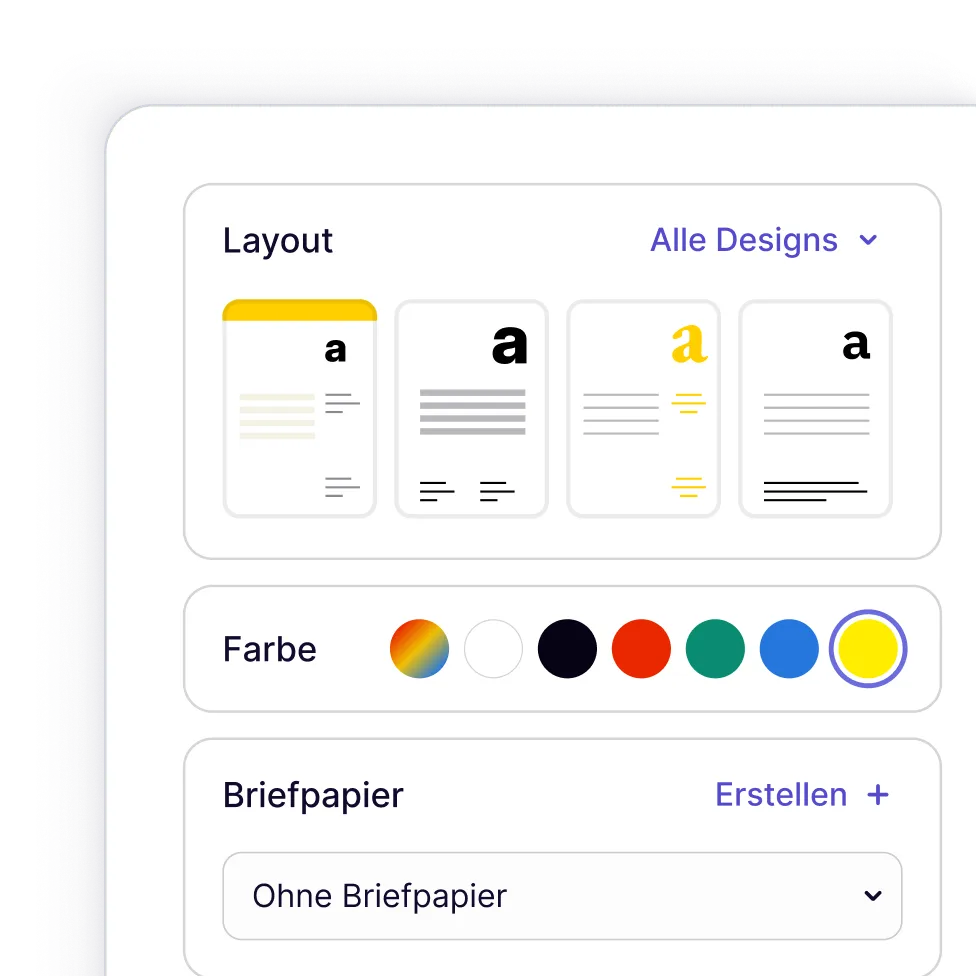
  • Switch between German and English in seconds
  • All mandatory fields translated automatically
  • Customizable design templates to match your brand
With zero headaches

Issue Cross-Border Invoices Correctly

Invoicing internationally means a few tax rules to keep in mind. Does reverse charge apply? Is VAT due or not? With sevdesk, you just tell it what kind of service you're providing and everything is handled and booked correctly from there.
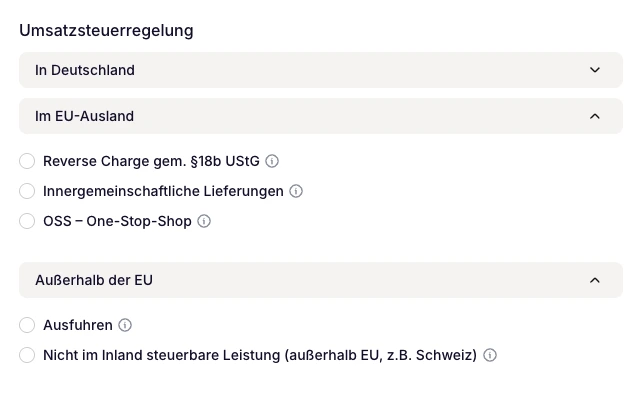
  • Reverse charge is applied and displayed correctly
  • VAT is prepared for the OSS procedure
  • Covers both EU countries and third countries
Only 3 Simple Steps

Dollars, pounds, francs – pick your currency and go

With sevdesk, you create invoices directly in the currency you need. The exchange rate is factored in automatically, so everything lands cleanly in your accounting.

sevdesk is the test winner with a grade of 1.1 in the 2026 German invoicing software comparison by FürGründer.

Book Foreign Currency Receipts Without the Mental Math

Got an invoice from a US provider in dollars or from a UK supplier in pounds? Just upload the receipt to sevdesk. The AI reads the amount, currency, and more, converts it using the current exchange rate, and everything is recorded correctly right away.

  • Automatically capture foreign currency receipts
  • No manual conversion needed
  • Clean categorization according to SKR 03 or SKR 04

Switch sevdesk to English

Prefer working in English, or your team doesn't speak German? Not a problem. sevdesk automatically detects your browser language and adjusts accordingly.

You can also change the language manually at any time in your profile settings.

All menus, features, and settings stay exactly the same, just in English. You get the full software experience, no compromises.

Sounds good? Try sevdesk free for 14 days, no risk, no credit card needed.

E-Invoicing in Germany

E-Invoices Made Easy

Since 2025, e-invoicing is mandatory for B2B transactions in Germany. That means: invoices must be issued in a structured, machine-readable format.

With sevdesk, you don't have to worry about the technical side. Just activate the e-invoice feature and sevdesk automatically sends out a ZUGFeRD or XRechnung compliant file.

Work Directly With Your Tax Advisor

End of the month, tax advisor waiting on documents. With sevdesk, that's no longer a headache. Just give them a tax advisor login, they see everything directly, and can pull data via DATEV export. Even if you work internationally, everything is neatly organized and ready to hand over.


  • Invite your tax advisor directly into sevdesk
  • DATEV export for a smooth handover
  • All receipts and invoices in one central, organized place
Trusted by more than 160,000 companies
Don't Just Take Our Word for It
“As a financial coach, I have high standards – especially for tools related to money that make my everyday work easier. And that’s exactly where sevdesk shines: smart, fast, and with a design that’s genuinely fun to use.
Henriette Dieckhoff
 · 
Financial coach
Trusted by more than 160,000 companies
Don't Just Take Our Word for It
“Back in the day, we used to bring everything to our tax advisor in a shoebox – and he wasn’t too thrilled about it. Now we do everything digitally and even save on those high accounting fees.”
Tim Schäfer
 · 
[030] Media
Trusted by more than 160,000 companies
Don't Just Take Our Word for It
“I used to spend countless hours buried in my paper-based bookkeeping! Since I started using sevdesk, doing my accounting has actually become almost fun.”
Alexa Voigtlaender
 · 
hantwerck.de

Simple Pricing for International Freelancers and Small Businesses

Choose the plan that fits your business. All plans include a 14-day free trial with full access.

Create e-invoices for free

Free

Ideal for anyone who wants to create e-invoices quickly and easily, at no cost.
€0.00
Free forever.
No credit card required.
View features

The Free plan includes these features:

  • Create up to 3 invoices / e-invoices per month
  • ZUGFeRD and XRechnung e-invoicing standards
  • Multiple invoice templates
  • Overview of your invoices
  • Add unlimited contacts
  • Add unlimited products and services
  • A comprehensive library of support resources to help you get started easily

Invoicing

Ideal for anyone who wants to create invoices quickly and easily.
-{percentage}% with {coupon}
€12.90
per month (excluding VAT)
Billed monthly.
View features

Everything as in
Free
and

  • Create unlimited (e-)invoices
    new
  • Create unlimited quotes
    Create professional quotes that comply with GoBD requirements, and send them by email or post via our mailing interface for confirmation. You can also apply customer-specific discounts.
  • Invoices for international customers
  • Progress and final invoices
  • Custom letterhead and logo
    Personalise your invoices with your logo, create reusable text blocks and choose from a range of layouts. Add your own letterhead.
  • Overview of outstanding invoices
    Keep track of due and outstanding invoices so you can take action in time and send payment reminders to your customers if needed.
  • Payment reminders
    Keep track of due payments and send legally compliant payment reminders, so you’re less likely to be left with unpaid invoices. You can also send dunning notices directly from sevdesk.
  • DATEV / ADDISON interface
    Work digitally with your tax adviser, with secure access to receipts, reports and tax-related settings.
  • Connect with your tax adviser
    Give your tax adviser direct access to your sevdesk account, so you don’t have to send them your data yourself.
  • All marketplace integrations (partner fees are not included)
    Expand your features with a wide range of partner integrations. Use interfaces to work more efficiently and transfer data automatically. Partner fees may apply and are not included in the plan price.
  • Personal support
    Get personal support via live chat, email and phone.
    Additional premium services are available as optional add-ons.
Our recommendation

Accounting

Ideal for anyone who wants to manage their receipts and finances and prepare their tax return.
-{percentage}% with {coupon}
€25.90
per month (excluding VAT)
Billed monthly.
View features
Everything as in
‍Invoicing and
  • Create unlimited (e-)invoices
    new
  • Supports single-entry and double-entry bookkeeping
    With single-entry bookkeeping, income and expenses are summarised at the end of the financial year in a cash-basis income statement (EÜR). Double-entry bookkeeping is carried out using a chart of accounts.
  • AI-powered receipt capture
    Scan receipts with the mobile app or upload them to your computer using drag and drop. Your receipts are matched to the relevant transactions, and sevdesk suggests an appropriate booking category.
  • Submit advance VAT returns directly to the tax office
    Prepare your advance VAT return in under two minutes and submit it directly to the tax office. Thanks to our integrated ELSTER interface, you don’t need an additional certificate.
  • Cash-basis income statement (EÜR) and profit and loss statement for your tax return
    sevdesk prepares a cash-basis income statement from your income and expenses. This method of calculating profit must be submitted to the tax office each year. By contrast, a profit and loss statement is based on the date the goods or services were delivered. Whether the income or expenses have already been paid is irrelevant.
  • Online banking connection
    Connect your online banking and manage incoming and outgoing payments directly in sevdesk. We already support more than 4,000 banks and digital banks.
  • Depreciation
    Your assets are automatically recognised from expense receipts and depreciated correctly: low-value assets are written off immediately, while other assets are depreciated in equal monthly instalments over their useful life. The depreciation is shown in your reports.
  • Order confirmations
    Turn an accepted quote into a legally compliant order confirmation containing the items you quoted and their corresponding quantities.
  • Delivery notes
    Create delivery notes to match your quote, including all required information. Any subsequent documents, such as the invoice, will automatically use the same reference.
  • Dunning levels
    Create a dunning notice for an overdue invoice and send it directly from sevdesk. This feature lets you manage every stage of your internal dunning process.
  • Cash book accounting
    Easily mark cash payments in the cash book. Record cash income and expenses for your business—ideal for petty cash. Your cash report is just one click away.
  • Trial balance
    The trial balance gives you a detailed view of your accounts and journal entries. You and your tax adviser can review transactions transparently, spot errors sooner and work together more efficiently than ever—as equal partners.
    Beta:

Accounting Pro

Ideal for anyone who wants to automate their bookkeeping and monitor their business in real time.
-{percentage}% with {coupon}
€34.90
per month (excluding VAT)
Billed monthly.
View features
Everything as in
Accounting and
  • Create unlimited (e-)invoices
    new
  • Advanced analysis and reporting on business transactions
    Expand your toolkit to gain a better understanding of your business’s financial position. sevdesk helps you drive business growth by making well-informed decisions.
  • Cost centres
    Assign invoices and receipts to different cost centres. You can then filter by cost centre and analyse the income and expenses assigned to each one.
  • REST API interface
    The REST API lets you manage data and features in sevdesk and connect external services to sevdesk. The API documentation helps you build your own solutions.
  • Business analysis report (BWA)
    Create a real-time business analysis report (BWA) based on current data from your digital bookkeeping in sevdesk. Use it to assess and monitor your business performance, review key financial figures and easily demonstrate your business’s performance to third parties, such as your bank.
Create e-invoices for free

Free

Ideal for anyone who wants to create e-invoices quickly and easily, at no cost.
€0.00
Free forever.
No credit card required.
View features

The Free plan includes these features:

  • Create up to 3 invoices / e-invoices per month
  • ZUGFeRD and XRechnung e-invoicing standards
  • Multiple invoice templates
  • Overview of your invoices
  • Add unlimited contacts
  • Add unlimited products and services
  • A comprehensive library of support resources to help you get started easily

The Free plan includes these features:

  • Create up to 3 invoices / e-invoices per month
  • ZUGFeRD and XRechnung e-invoicing standards
  • Multiple invoice templates
  • Overview of your invoices
  • Add unlimited contacts
  • Add unlimited products and services
  • A comprehensive library of support resources to help you get started easily

Invoicing

Ideal for anyone who wants to create invoices quickly and easily.
-{percentage}% with {coupon}
€12.90
per month (excluding VAT)
Billed annually.
View features

Everything as in
Free
and

  • Create unlimited (e-)invoices
    new
  • Create unlimited quotes
    Create professional quotes that comply with GoBD requirements, and send them by email or post via our mailing interface for confirmation. You can also apply customer-specific discounts.
  • Invoices for international customers
  • Progress and final invoices
  • Custom letterhead and logo
    Personalise your invoices with your logo, create reusable text blocks and choose from a range of layouts. Add your own letterhead.
  • Overview of outstanding invoices
    Keep track of due and outstanding invoices so you can take action in time and send payment reminders to your customers if needed.
  • Payment reminders
    Keep track of due payments and send legally compliant payment reminders, so you’re less likely to be left with unpaid invoices. You can also send dunning notices directly from sevdesk.
  • DATEV / ADDISON interface
    Work digitally with your tax adviser, with secure access to receipts, reports and tax-related settings.
  • Connect with your tax adviser
    Give your tax adviser direct access to your sevdesk account, so you don’t have to send them your data yourself.
  • All marketplace integrations (partner fees are not included)
    Expand your features with a wide range of partner integrations. Use interfaces to work more efficiently and transfer data automatically. Partner fees may apply and are not included in the plan price.
  • Personal support
    Get personal support via live chat, email and phone.
    Additional premium services are available as optional add-ons.
Our recommendation

Accounting

Ideal for anyone who wants to manage their receipts and finances and prepare their tax return.
-{percentage}% with {coupon}
€25.90
per month (excluding VAT)
Billed annually.
View features
Everything as in
‍Invoicing and
  • Create unlimited (e-)invoices
    new
  • Supports single-entry and double-entry bookkeeping
    With single-entry bookkeeping, income and expenses are summarised at the end of the financial year in a cash-basis income statement (EÜR). Double-entry bookkeeping is carried out using a chart of accounts.
  • AI-powered receipt capture
    Scan receipts with the mobile app or upload them to your computer using drag and drop. Your receipts are matched to the relevant transactions, and sevdesk suggests an appropriate booking category.
  • Submit advance VAT returns directly to the tax office
    Prepare your advance VAT return in under two minutes and submit it directly to the tax office. Thanks to our integrated ELSTER interface, you don’t need an additional certificate.
  • Cash-basis income statement (EÜR) and profit and loss statement for your tax return
    sevdesk prepares a cash-basis income statement from your income and expenses. This method of calculating profit must be submitted to the tax office each year. By contrast, a profit and loss statement is based on the date the goods or services were delivered. Whether the income or expenses have already been paid is irrelevant.
  • Online banking connection
    Connect your online banking and manage incoming and outgoing payments directly in sevdesk. We already support more than 4,000 banks and digital banks.
  • Depreciation
    Your assets are automatically recognised from expense receipts and depreciated correctly: low-value assets are written off immediately, while other assets are depreciated in equal monthly instalments over their useful life. The depreciation is shown in your reports.
  • Order confirmations
    Turn an accepted quote into a legally compliant order confirmation containing the items you quoted and their corresponding quantities.
  • Delivery notes
    Create delivery notes to match your quote, including all required information. Any subsequent documents, such as the invoice, will automatically use the same reference.
  • Dunning levels
    Create a dunning notice for an overdue invoice and send it directly from sevdesk. This feature lets you manage every stage of your internal dunning process.
  • Cash book accounting
    Easily mark cash payments in the cash book. Record cash income and expenses for your business—ideal for petty cash. Your cash report is just one click away.
  • Trial balance
    The trial balance gives you a detailed view of your accounts and journal entries. You and your tax adviser can review transactions transparently, spot errors sooner and work together more efficiently than ever—as equal partners.
    Beta:

Accounting Pro

Ideal for anyone who wants to automate their bookkeeping and monitor their business in real time.
-{percentage}% with {coupon}
€34.90
per month (excluding VAT)
Billed annually.
View features
Everything as in
Accounting and
  • Create unlimited (e-)invoices
    new
  • Advanced analysis and reporting on business transactions
    Expand your toolkit to gain a better understanding of your business’s financial position. sevdesk helps you drive business growth by making well-informed decisions.
  • Cost centres
    Assign invoices and receipts to different cost centres. You can then filter by cost centre and analyse the income and expenses assigned to each one.
  • REST API interface
    The REST API lets you manage data and features in sevdesk and connect external services to sevdesk. The API documentation helps you build your own solutions.
  • Business analysis report (BWA)
    Create a real-time business analysis report (BWA) based on current data from your digital bookkeeping in sevdesk. Use it to assess and monitor your business performance, review key financial figures and easily demonstrate your business’s performance to third parties, such as your bank.
Create e-invoices for free

Free

Ideal for anyone who wants to create e-invoices quickly and easily, at no cost.
€0.00
Free forever.
No credit card required.
View features

The Free plan includes these features:

  • Create up to 3 invoices / e-invoices per month
  • ZUGFeRD and XRechnung e-invoicing standards
  • Multiple invoice templates
  • Overview of your invoices
  • Add unlimited contacts
  • Add unlimited products and services
  • A comprehensive library of support resources to help you get started easily

The Free plan includes these features:

  • Create up to 3 invoices / e-invoices per month
  • ZUGFeRD and XRechnung e-invoicing standards
  • Multiple invoice templates
  • Overview of your invoices
  • Add unlimited contacts
  • Add unlimited products and services
  • A comprehensive library of support resources to help you get started easily

Invoicing

Ideal for anyone who wants to create invoices quickly and easily.
-{percentage}% with {coupon}
€12.90
per month (excluding VAT)
Billed every two years.
View features

Everything as in
Free
and

  • Create unlimited (e-)invoices
    new
  • Create unlimited quotes
    Create professional quotes that comply with GoBD requirements, and send them by email or post via our mailing interface for confirmation. You can also apply customer-specific discounts.
  • Invoices for international customers
  • Progress and final invoices
  • Custom letterhead and logo
    Personalise your invoices with your logo, create reusable text blocks and choose from a range of layouts. Add your own letterhead.
  • Overview of outstanding invoices
    Keep track of due and outstanding invoices so you can take action in time and send payment reminders to your customers if needed.
  • Payment reminders
    Keep track of due payments and send legally compliant payment reminders, so you’re less likely to be left with unpaid invoices. You can also send dunning notices directly from sevdesk.
  • DATEV / ADDISON interface
    Work digitally with your tax adviser, with secure access to receipts, reports and tax-related settings.
  • Connect with your tax adviser
    Give your tax adviser direct access to your sevdesk account, so you don’t have to send them your data yourself.
  • All marketplace integrations (partner fees are not included)
    Expand your features with a wide range of partner integrations. Use interfaces to work more efficiently and transfer data automatically. Partner fees may apply and are not included in the plan price.
  • Personal support
    Get personal support via live chat, email and phone.
    Additional premium services are available as optional add-ons.
Our recommendation

Accounting

Ideal for anyone who wants to manage their receipts and finances and prepare their tax return.
-{percentage}% with {coupon}
€25.90
per month (excluding VAT)
Billed every two years.
View features
Everything as in
‍Invoicing and
  • Create unlimited (e-)invoices
    new
  • Supports single-entry and double-entry bookkeeping
    With single-entry bookkeeping, income and expenses are summarised at the end of the financial year in a cash-basis income statement (EÜR). Double-entry bookkeeping is carried out using a chart of accounts.
  • AI-powered receipt capture
    Scan receipts with the mobile app or upload them to your computer using drag and drop. Your receipts are matched to the relevant transactions, and sevdesk suggests an appropriate booking category.
  • Submit advance VAT returns directly to the tax office
    Prepare your advance VAT return in under two minutes and submit it directly to the tax office. Thanks to our integrated ELSTER interface, you don’t need an additional certificate.
  • Cash-basis income statement (EÜR) and profit and loss statement for your tax return
    sevdesk prepares a cash-basis income statement from your income and expenses. This method of calculating profit must be submitted to the tax office each year. By contrast, a profit and loss statement is based on the date the goods or services were delivered. Whether the income or expenses have already been paid is irrelevant.
  • Online banking connection
    Connect your online banking and manage incoming and outgoing payments directly in sevdesk. We already support more than 4,000 banks and digital banks.
  • Depreciation
    Your assets are automatically recognised from expense receipts and depreciated correctly: low-value assets are written off immediately, while other assets are depreciated in equal monthly instalments over their useful life. The depreciation is shown in your reports.
  • Order confirmations
    Turn an accepted quote into a legally compliant order confirmation containing the items you quoted and their corresponding quantities.
  • Delivery notes
    Create delivery notes to match your quote, including all required information. Any subsequent documents, such as the invoice, will automatically use the same reference.
  • Dunning levels
    Create a dunning notice for an overdue invoice and send it directly from sevdesk. This feature lets you manage every stage of your internal dunning process.
  • Cash book accounting
    Easily mark cash payments in the cash book. Record cash income and expenses for your business—ideal for petty cash. Your cash report is just one click away.
  • Trial balance
    The trial balance gives you a detailed view of your accounts and journal entries. You and your tax adviser can review transactions transparently, spot errors sooner and work together more efficiently than ever—as equal partners.
    Beta:

Accounting Pro

Ideal for anyone who wants to automate their bookkeeping and monitor their business in real time.
-{percentage}% with {coupon}
€34.90
per month (excluding VAT)
Billed every two years.
View features
Everything as in
Accounting and
  • Create unlimited (e-)invoices
    new
  • Advanced analysis and reporting on business transactions
    Expand your toolkit to gain a better understanding of your business’s financial position. sevdesk helps you drive business growth by making well-informed decisions.
  • Cost centres
    Assign invoices and receipts to different cost centres. You can then filter by cost centre and analyse the income and expenses assigned to each one.
  • REST API interface
    The REST API lets you manage data and features in sevdesk and connect external services to sevdesk. The API documentation helps you build your own solutions.
  • Business analysis report (BWA)
    Create a real-time business analysis report (BWA) based on current data from your digital bookkeeping in sevdesk. Use it to assess and monitor your business performance, review key financial figures and easily demonstrate your business’s performance to third parties, such as your bank.

Ready to take the stress out of international accounting?

Try sevdesk free for 14 days. No credit card needed, no strings attached.
Still open questions?

FAQs on English and Foreign Currency Invoices

Can I write invoices in English with sevdesk?

Pfeil nach unten.

Which foreign currencies does sevdesk support?

Pfeil nach unten.

How does reverse charge work in sevdesk?

Pfeil nach unten.

Can I switch the sevdesk interface to English?

Pfeil nach unten.

Can I record receipts in foreign currencies in sevdesk?

Pfeil nach unten.

Is sevdesk suitable for expats?

Pfeil nach unten.

What is the OSS procedure, and does sevdesk support it?

Pfeil nach unten.

Can I try sevdesk for free?

Pfeil nach unten.

How much does sevdesk cost?

Pfeil nach unten.

Who is sevdesk for?

Pfeil nach unten.
Try sevdesk 14 days for free
2.900+
Reviews
4,3
Trusted