Externe Inhalte
An dieser Stelle findest du externe Inhalte von YouTube. Durch Klick auf “Externe Inhalte laden” erklärst du dich damit einverstanden, dass dir externe Inhalte angezeigt werden. Dabei werden personenbezogene Daten an die Drittplattform übermittelt.
Weitere Informationen findest du in unserer Datenschutzerklärung und der Datenschutzerklärung von YouTube.
Award winner 2026

E‑invoice software for Germany

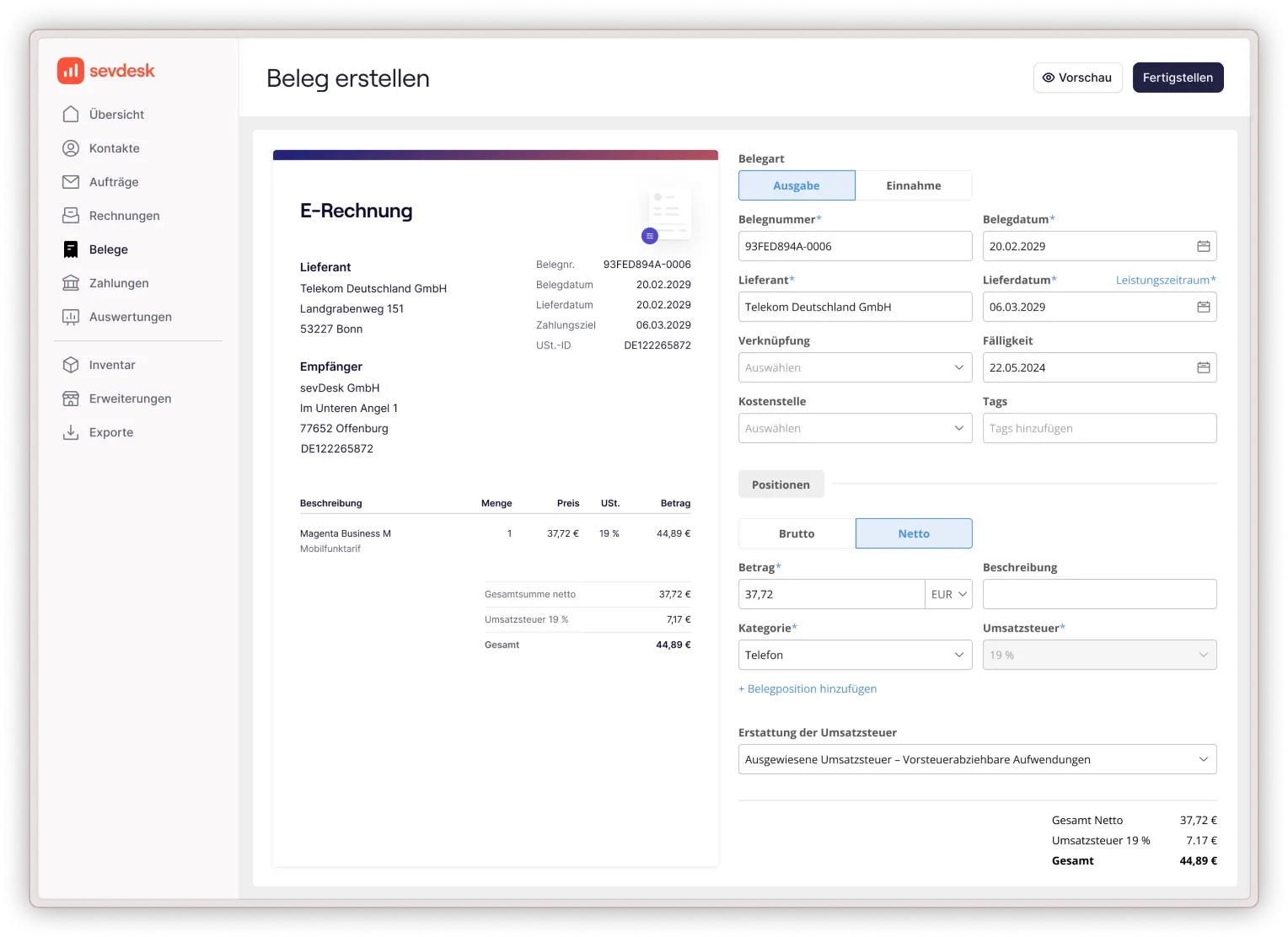
Simplify your invoicing and stay ahead of Germany’s new e‑invoicing regulations. Create and send e‑invoices in just a few clicks and receive and process incoming e-invoices. All easy and compliant. With sevdesk.
  • Create e-invoices in the required formats with one click
  • Read & process incoming e-invoices with no extra effort
  • Automate your whole accounting
More than 160,000 companies trust sevdesk

What is an e‑invoice?

An e-invoice is a structured digital invoice that allows companies to exchange billing data electronically without manual handling or paper documents.

In Germany, e-invoices are mandatory for B2B transactions since January 2025. This means companies need a solution that generates and reads e-invoices in the official formats such as XRechnung or ZUGFeRD, ensures data accuracy, and guarantees compliance.

That is exactly what sevdesk does for you. It automates the entire process so you stay compliant and efficient.

Award‑winning software companies trust

In 2026, FürGründer.de awarded sevdesk an outstanding score of 1.1 and named it Test Winner for accounting and invoicing software.

Thousands of businesses rely on sevdesk to manage their finances digitally and efficiently.
Tested by FürGründer

Your all‑in‑one solution for e‑invoicing

With sevdesk, you get everything you need to handle your e‑invoices in one simple software:

Create and send e‑invoices with one click

Generate compliant invoices directly from your client list or quote.
Mehr zum Dashboard
→
→

Receive and process incoming e‑invoices automatically

Incoming invoices are imported and stored digitally, ready for accounting.
Mehr zu Rechnungen
→
→

Ensure full compliance

Use the correct formats including XRechnung and ZUGFeRD automatically.
Mehr zu Belege
→
→

Access your invoices anytime, anywhere

Work securely in the cloud via browser or mobile app and keep your finances under control.
Mehr zu Online-Banking
→
→
Experience simple e-invoicing in action

Create e‑invoices in seconds

Write a legally compliant e-invoice faster than ever. Enter (or re-use) customer details, add your services or products and send your invoice digitally.
sevdesk automatically generates a valid XRechnung or ZUGFeRD in the background. No need to worry about technical issues.
With sevdesk you:

  • Save valuable time through automation
  • Eliminate manual typing errors
  • Always send invoices that meet German e-invoicing standards

Receive and process e‑invoice effortlessly

Incoming e-invoices are processed automatically. sevdesk reads all relevant data, assigns it to the correct contact and categorizes it for your bookkeeping.

No more downloading attachments or sorting through paper invoices.

Your benefits:

  • Automatic data extraction and sorting
  • Clear overview of all incoming invoices
  • Easy upload via app, drag and drop or e-mail

Ready to simplify your invoicing?

Start your free trial today and experience how easy e‑invoicing in Germany can be.
No installation. No risk. Just results.

Work smarter with the sevdesk app

Manage your invoicing wherever you are. With the sevdesk app, you can check payments, send invoices, upload receipts and stay in control of your finances on the go.
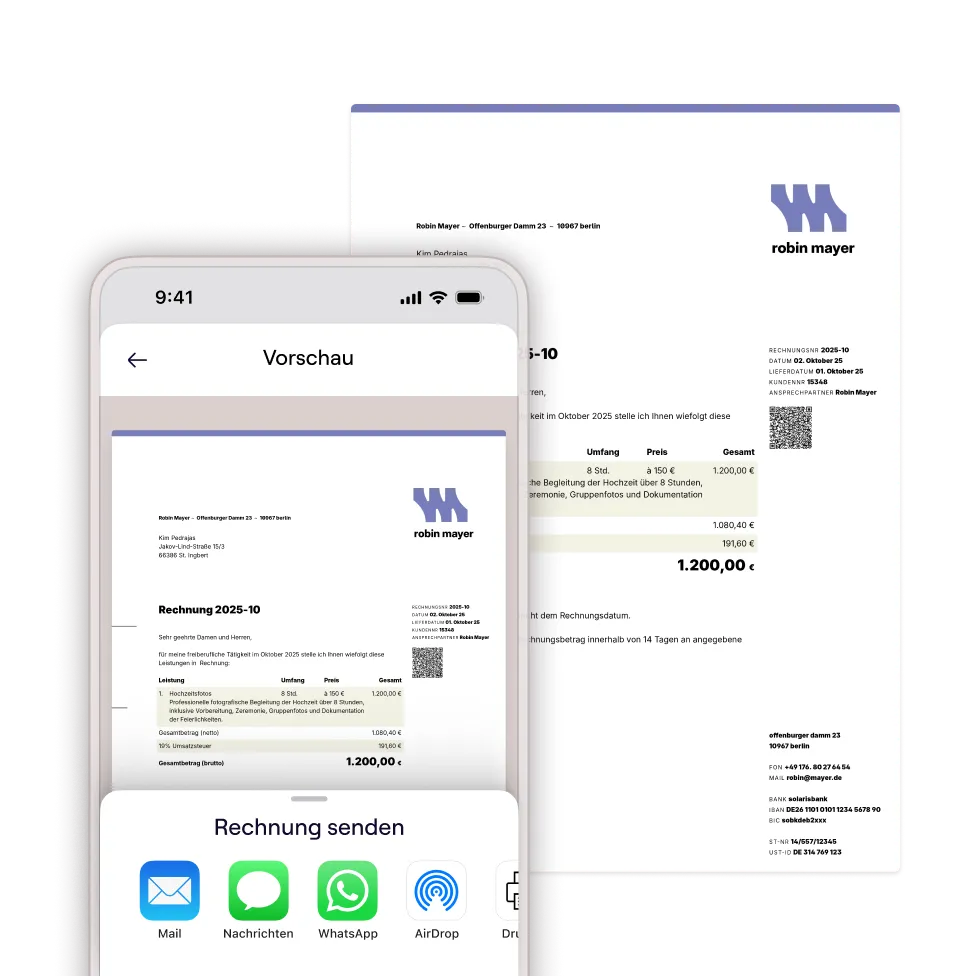

  • Full access to your finances, anytime and anywhere
  • Automatic synchronization across desktop and mobile
  • Simple, intuitive interface designed for busy entrepreneurs
Trusted by more than 160,000 companies
What our customers say
“Back in the day, we used to bring everything to our tax advisor in a shoebox – and he wasn’t too thrilled about it. Now we do everything digitally and even save on those high accounting fees.”
Tim Schäfer
 · 
[030] Media
Trusted by more than 160,000 companies
What our customers say
“I used to spend countless hours buried in my paper-based bookkeeping! Since I started using sevdesk, doing my accounting has actually become almost fun.”
Alexa Voigtlaender
 · 
hantwerck.de
Trusted by more than 160,000 companies
What our customers say
“As a financial coach, I have high standards – especially for tools related to money that make my everyday work easier. And that’s exactly where sevdesk shines: smart, fast, and with a design that’s genuinely fun to use.
Henriette Dieckhoff
 · 
Financial coach

Choose your e-invoice plan

Find the sevdesk plan that fits your business, whether you are a freelancer, a small business owner or part of a growing company.

All plans include creating e-invoices that follow German standards. Higher plans add expense management, powerful accounting automation and reporting tools. Start your 14‑day free trial and explore all features.

Create e-invoices for free

Free

Ideal for anyone who wants to create e-invoices quickly and easily, at no cost.
€0.00
Free forever.
No credit card required.
View features

The Free plan includes these features:

  • Create up to 3 invoices / e-invoices per month
  • ZUGFeRD and XRechnung e-invoicing standards
  • Multiple invoice templates
  • Overview of your invoices
  • Add unlimited contacts
  • Add unlimited products and services
  • A comprehensive library of support resources to help you get started easily

Invoicing

Ideal for anyone who wants to create invoices quickly and easily.
-{percentage}% with {coupon}
€12.90
per month (excluding VAT)
Billed monthly.
View features

Everything as in
Free
and

  • Create unlimited (e-)invoices
    new
  • Create unlimited quotes
    Create professional quotes that comply with GoBD requirements, and send them by email or post via our mailing interface for confirmation. You can also apply customer-specific discounts.
  • Invoices for international customers
  • Progress and final invoices
  • Custom letterhead and logo
    Personalise your invoices with your logo, create reusable text blocks and choose from a range of layouts. Add your own letterhead.
  • Overview of outstanding invoices
    Keep track of due and outstanding invoices so you can take action in time and send payment reminders to your customers if needed.
  • Payment reminders
    Keep track of due payments and send legally compliant payment reminders, so you’re less likely to be left with unpaid invoices. You can also send dunning notices directly from sevdesk.
  • DATEV / ADDISON interface
    Work digitally with your tax adviser, with secure access to receipts, reports and tax-related settings.
  • Connect with your tax adviser
    Give your tax adviser direct access to your sevdesk account, so you don’t have to send them your data yourself.
  • All marketplace integrations (partner fees are not included)
    Expand your features with a wide range of partner integrations. Use interfaces to work more efficiently and transfer data automatically. Partner fees may apply and are not included in the plan price.
  • Personal support
    Get personal support via live chat, email and phone.
    Additional premium services are available as optional add-ons.
Our recommendation

Accounting

Ideal for anyone who wants to manage their receipts and finances and prepare their tax return.
-{percentage}% with {coupon}
€25.90
per month (excluding VAT)
Billed monthly.
View features
Everything as in
‍Invoicing and
  • Create unlimited (e-)invoices
    new
  • Supports single-entry and double-entry bookkeeping
    With single-entry bookkeeping, income and expenses are summarised at the end of the financial year in a cash-basis income statement (EÜR). Double-entry bookkeeping is carried out using a chart of accounts.
  • AI-powered receipt capture
    Scan receipts with the mobile app or upload them to your computer using drag and drop. Your receipts are matched to the relevant transactions, and sevdesk suggests an appropriate booking category.
  • Submit advance VAT returns directly to the tax office
    Prepare your advance VAT return in under two minutes and submit it directly to the tax office. Thanks to our integrated ELSTER interface, you don’t need an additional certificate.
  • Cash-basis income statement (EÜR) and profit and loss statement for your tax return
    sevdesk prepares a cash-basis income statement from your income and expenses. This method of calculating profit must be submitted to the tax office each year. By contrast, a profit and loss statement is based on the date the goods or services were delivered. Whether the income or expenses have already been paid is irrelevant.
  • Online banking connection
    Connect your online banking and manage incoming and outgoing payments directly in sevdesk. We already support more than 4,000 banks and digital banks.
  • Depreciation
    Your assets are automatically recognised from expense receipts and depreciated correctly: low-value assets are written off immediately, while other assets are depreciated in equal monthly instalments over their useful life. The depreciation is shown in your reports.
  • Order confirmations
    Turn an accepted quote into a legally compliant order confirmation containing the items you quoted and their corresponding quantities.
  • Delivery notes
    Create delivery notes to match your quote, including all required information. Any subsequent documents, such as the invoice, will automatically use the same reference.
  • Dunning levels
    Create a dunning notice for an overdue invoice and send it directly from sevdesk. This feature lets you manage every stage of your internal dunning process.
  • Cash book accounting
    Easily mark cash payments in the cash book. Record cash income and expenses for your business—ideal for petty cash. Your cash report is just one click away.
  • Trial balance
    The trial balance gives you a detailed view of your accounts and journal entries. You and your tax adviser can review transactions transparently, spot errors sooner and work together more efficiently than ever—as equal partners.
    Beta:

Accounting Pro

Ideal for anyone who wants to automate their bookkeeping and monitor their business in real time.
-{percentage}% with {coupon}
€34.90
per month (excluding VAT)
Billed monthly.
View features
Everything as in
Accounting and
  • Create unlimited (e-)invoices
    new
  • Advanced analysis and reporting on business transactions
    Expand your toolkit to gain a better understanding of your business’s financial position. sevdesk helps you drive business growth by making well-informed decisions.
  • Cost centres
    Assign invoices and receipts to different cost centres. You can then filter by cost centre and analyse the income and expenses assigned to each one.
  • REST API interface
    The REST API lets you manage data and features in sevdesk and connect external services to sevdesk. The API documentation helps you build your own solutions.
  • Business analysis report (BWA)
    Create a real-time business analysis report (BWA) based on current data from your digital bookkeeping in sevdesk. Use it to assess and monitor your business performance, review key financial figures and easily demonstrate your business’s performance to third parties, such as your bank.
Create e-invoices for free

Free

Ideal for anyone who wants to create e-invoices quickly and easily, at no cost.
€0.00
Free forever.
No credit card required.
View features

The Free plan includes these features:

  • Create up to 3 invoices / e-invoices per month
  • ZUGFeRD and XRechnung e-invoicing standards
  • Multiple invoice templates
  • Overview of your invoices
  • Add unlimited contacts
  • Add unlimited products and services
  • A comprehensive library of support resources to help you get started easily

The Free plan includes these features:

  • Create up to 3 invoices / e-invoices per month
  • ZUGFeRD and XRechnung e-invoicing standards
  • Multiple invoice templates
  • Overview of your invoices
  • Add unlimited contacts
  • Add unlimited products and services
  • A comprehensive library of support resources to help you get started easily

Invoicing

Ideal for anyone who wants to create invoices quickly and easily.
-{percentage}% with {coupon}
€12.90
per month (excluding VAT)
Billed annually.
View features

Everything as in
Free
and

  • Create unlimited (e-)invoices
    new
  • Create unlimited quotes
    Create professional quotes that comply with GoBD requirements, and send them by email or post via our mailing interface for confirmation. You can also apply customer-specific discounts.
  • Invoices for international customers
  • Progress and final invoices
  • Custom letterhead and logo
    Personalise your invoices with your logo, create reusable text blocks and choose from a range of layouts. Add your own letterhead.
  • Overview of outstanding invoices
    Keep track of due and outstanding invoices so you can take action in time and send payment reminders to your customers if needed.
  • Payment reminders
    Keep track of due payments and send legally compliant payment reminders, so you’re less likely to be left with unpaid invoices. You can also send dunning notices directly from sevdesk.
  • DATEV / ADDISON interface
    Work digitally with your tax adviser, with secure access to receipts, reports and tax-related settings.
  • Connect with your tax adviser
    Give your tax adviser direct access to your sevdesk account, so you don’t have to send them your data yourself.
  • All marketplace integrations (partner fees are not included)
    Expand your features with a wide range of partner integrations. Use interfaces to work more efficiently and transfer data automatically. Partner fees may apply and are not included in the plan price.
  • Personal support
    Get personal support via live chat, email and phone.
    Additional premium services are available as optional add-ons.
Our recommendation

Accounting

Ideal for anyone who wants to manage their receipts and finances and prepare their tax return.
-{percentage}% with {coupon}
€25.90
per month (excluding VAT)
Billed annually.
View features
Everything as in
‍Invoicing and
  • Create unlimited (e-)invoices
    new
  • Supports single-entry and double-entry bookkeeping
    With single-entry bookkeeping, income and expenses are summarised at the end of the financial year in a cash-basis income statement (EÜR). Double-entry bookkeeping is carried out using a chart of accounts.
  • AI-powered receipt capture
    Scan receipts with the mobile app or upload them to your computer using drag and drop. Your receipts are matched to the relevant transactions, and sevdesk suggests an appropriate booking category.
  • Submit advance VAT returns directly to the tax office
    Prepare your advance VAT return in under two minutes and submit it directly to the tax office. Thanks to our integrated ELSTER interface, you don’t need an additional certificate.
  • Cash-basis income statement (EÜR) and profit and loss statement for your tax return
    sevdesk prepares a cash-basis income statement from your income and expenses. This method of calculating profit must be submitted to the tax office each year. By contrast, a profit and loss statement is based on the date the goods or services were delivered. Whether the income or expenses have already been paid is irrelevant.
  • Online banking connection
    Connect your online banking and manage incoming and outgoing payments directly in sevdesk. We already support more than 4,000 banks and digital banks.
  • Depreciation
    Your assets are automatically recognised from expense receipts and depreciated correctly: low-value assets are written off immediately, while other assets are depreciated in equal monthly instalments over their useful life. The depreciation is shown in your reports.
  • Order confirmations
    Turn an accepted quote into a legally compliant order confirmation containing the items you quoted and their corresponding quantities.
  • Delivery notes
    Create delivery notes to match your quote, including all required information. Any subsequent documents, such as the invoice, will automatically use the same reference.
  • Dunning levels
    Create a dunning notice for an overdue invoice and send it directly from sevdesk. This feature lets you manage every stage of your internal dunning process.
  • Cash book accounting
    Easily mark cash payments in the cash book. Record cash income and expenses for your business—ideal for petty cash. Your cash report is just one click away.
  • Trial balance
    The trial balance gives you a detailed view of your accounts and journal entries. You and your tax adviser can review transactions transparently, spot errors sooner and work together more efficiently than ever—as equal partners.
    Beta:

Accounting Pro

Ideal for anyone who wants to automate their bookkeeping and monitor their business in real time.
-{percentage}% with {coupon}
€34.90
per month (excluding VAT)
Billed annually.
View features
Everything as in
Accounting and
  • Create unlimited (e-)invoices
    new
  • Advanced analysis and reporting on business transactions
    Expand your toolkit to gain a better understanding of your business’s financial position. sevdesk helps you drive business growth by making well-informed decisions.
  • Cost centres
    Assign invoices and receipts to different cost centres. You can then filter by cost centre and analyse the income and expenses assigned to each one.
  • REST API interface
    The REST API lets you manage data and features in sevdesk and connect external services to sevdesk. The API documentation helps you build your own solutions.
  • Business analysis report (BWA)
    Create a real-time business analysis report (BWA) based on current data from your digital bookkeeping in sevdesk. Use it to assess and monitor your business performance, review key financial figures and easily demonstrate your business’s performance to third parties, such as your bank.
Create e-invoices for free

Free

Ideal for anyone who wants to create e-invoices quickly and easily, at no cost.
€0.00
Free forever.
No credit card required.
View features

The Free plan includes these features:

  • Create up to 3 invoices / e-invoices per month
  • ZUGFeRD and XRechnung e-invoicing standards
  • Multiple invoice templates
  • Overview of your invoices
  • Add unlimited contacts
  • Add unlimited products and services
  • A comprehensive library of support resources to help you get started easily

The Free plan includes these features:

  • Create up to 3 invoices / e-invoices per month
  • ZUGFeRD and XRechnung e-invoicing standards
  • Multiple invoice templates
  • Overview of your invoices
  • Add unlimited contacts
  • Add unlimited products and services
  • A comprehensive library of support resources to help you get started easily

Invoicing

Ideal for anyone who wants to create invoices quickly and easily.
-{percentage}% with {coupon}
€12.90
per month (excluding VAT)
Billed every two years.
View features

Everything as in
Free
and

  • Create unlimited (e-)invoices
    new
  • Create unlimited quotes
    Create professional quotes that comply with GoBD requirements, and send them by email or post via our mailing interface for confirmation. You can also apply customer-specific discounts.
  • Invoices for international customers
  • Progress and final invoices
  • Custom letterhead and logo
    Personalise your invoices with your logo, create reusable text blocks and choose from a range of layouts. Add your own letterhead.
  • Overview of outstanding invoices
    Keep track of due and outstanding invoices so you can take action in time and send payment reminders to your customers if needed.
  • Payment reminders
    Keep track of due payments and send legally compliant payment reminders, so you’re less likely to be left with unpaid invoices. You can also send dunning notices directly from sevdesk.
  • DATEV / ADDISON interface
    Work digitally with your tax adviser, with secure access to receipts, reports and tax-related settings.
  • Connect with your tax adviser
    Give your tax adviser direct access to your sevdesk account, so you don’t have to send them your data yourself.
  • All marketplace integrations (partner fees are not included)
    Expand your features with a wide range of partner integrations. Use interfaces to work more efficiently and transfer data automatically. Partner fees may apply and are not included in the plan price.
  • Personal support
    Get personal support via live chat, email and phone.
    Additional premium services are available as optional add-ons.
Our recommendation

Accounting

Ideal for anyone who wants to manage their receipts and finances and prepare their tax return.
-{percentage}% with {coupon}
€25.90
per month (excluding VAT)
Billed every two years.
View features
Everything as in
‍Invoicing and
  • Create unlimited (e-)invoices
    new
  • Supports single-entry and double-entry bookkeeping
    With single-entry bookkeeping, income and expenses are summarised at the end of the financial year in a cash-basis income statement (EÜR). Double-entry bookkeeping is carried out using a chart of accounts.
  • AI-powered receipt capture
    Scan receipts with the mobile app or upload them to your computer using drag and drop. Your receipts are matched to the relevant transactions, and sevdesk suggests an appropriate booking category.
  • Submit advance VAT returns directly to the tax office
    Prepare your advance VAT return in under two minutes and submit it directly to the tax office. Thanks to our integrated ELSTER interface, you don’t need an additional certificate.
  • Cash-basis income statement (EÜR) and profit and loss statement for your tax return
    sevdesk prepares a cash-basis income statement from your income and expenses. This method of calculating profit must be submitted to the tax office each year. By contrast, a profit and loss statement is based on the date the goods or services were delivered. Whether the income or expenses have already been paid is irrelevant.
  • Online banking connection
    Connect your online banking and manage incoming and outgoing payments directly in sevdesk. We already support more than 4,000 banks and digital banks.
  • Depreciation
    Your assets are automatically recognised from expense receipts and depreciated correctly: low-value assets are written off immediately, while other assets are depreciated in equal monthly instalments over their useful life. The depreciation is shown in your reports.
  • Order confirmations
    Turn an accepted quote into a legally compliant order confirmation containing the items you quoted and their corresponding quantities.
  • Delivery notes
    Create delivery notes to match your quote, including all required information. Any subsequent documents, such as the invoice, will automatically use the same reference.
  • Dunning levels
    Create a dunning notice for an overdue invoice and send it directly from sevdesk. This feature lets you manage every stage of your internal dunning process.
  • Cash book accounting
    Easily mark cash payments in the cash book. Record cash income and expenses for your business—ideal for petty cash. Your cash report is just one click away.
  • Trial balance
    The trial balance gives you a detailed view of your accounts and journal entries. You and your tax adviser can review transactions transparently, spot errors sooner and work together more efficiently than ever—as equal partners.
    Beta:

Accounting Pro

Ideal for anyone who wants to automate their bookkeeping and monitor their business in real time.
-{percentage}% with {coupon}
€34.90
per month (excluding VAT)
Billed every two years.
View features
Everything as in
Accounting and
  • Create unlimited (e-)invoices
    new
  • Advanced analysis and reporting on business transactions
    Expand your toolkit to gain a better understanding of your business’s financial position. sevdesk helps you drive business growth by making well-informed decisions.
  • Cost centres
    Assign invoices and receipts to different cost centres. You can then filter by cost centre and analyse the income and expenses assigned to each one.
  • REST API interface
    The REST API lets you manage data and features in sevdesk and connect external services to sevdesk. The API documentation helps you build your own solutions.
  • Business analysis report (BWA)
    Create a real-time business analysis report (BWA) based on current data from your digital bookkeeping in sevdesk. Use it to assess and monitor your business performance, review key financial figures and easily demonstrate your business’s performance to third parties, such as your bank.

Take the next step toward effortless e‑invoicing

Start your free trial and handle your invoices with confidence.
Still open questions?

FAQs about e‑invoicing in Germany

What is an e‑invoice in Germany?

Pfeil nach unten.

Is e‑invoicing mandatory in Germany?

Pfeil nach unten.

Is there a mandatory transmission plattform like Peppol in Germany?

Pfeil nach unten.

What do I need to issue an e‑invoice in Germany?

Pfeil nach unten.

Which formats are required for e‑invoices in Germany?

Pfeil nach unten.

Is a PDF considered an e‑invoice in Germany?

Pfeil nach unten.

Can I issue invoices in English and German with sevdesk?

Pfeil nach unten.

Is sevdesk compliant with German e‑invoicing standards?

Pfeil nach unten.

Do I need technical knowledge to create e‑invoices in sevdesk?

Pfeil nach unten.

Is sevdesk available in English?

Pfeil nach unten.
Try sevdesk 14 days for free
2.900+
Reviews
4,3
Trusted