Get up to 60% discount on 6 months on your desired plan
If you run a business in Germany, you will keep coming across two terms: ZUGFeRD and XRechnung. Both are formats for electronic invoices, and both meet the German e-invoicing rules. This guide explains what each format is, how it works and where it is used. It then shows how the two compare.
Since 1 January 2025, every business in Germany has to be able to receive e-invoices for B2B transactions. A simple PDF invoice no longer counts as an e-invoice. An e-invoice has to be a structured data set that software can read automatically. Invoices to private customers are not covered.
Two formats have become the standard in practice:
Both formats follow the European standard EN 16931 and meet the German legal requirements. Let us look at each one in detail.
ZUGFeRD is a hybrid e-invoice format. It combines two components in one file:
This combination makes ZUGFeRD very flexible. You can use it for business-to-business invoices (B2B) and for invoices to public authorities (B2G). Because people can read the PDF, you could even use it for invoices to private customers (B2C). One format covers all your customers.
The name is short for "Zentraler User Guide des Forums elektronische Rechnung Deutschland". In English, that is the central user guide of the German Forum for Electronic Invoicing.
ZUGFeRD comes in different profiles, which differ in how much data they contain. For the German e-invoicing obligation, you need version 2.0.1 or later, and the profile matters:
One more point to keep in mind: the XML data is what counts. If the PDF and the XML ever differ, the XML is the legally relevant part.
Is ZUGFeRD the right format for you as an invoice issuer? This is what speaks for and against it.
In short, ZUGFeRD is a flexible solution for businesses that want to combine a familiar PDF invoice with machine-readable data.
On the surface, a ZUGFeRD invoice looks like any other PDF invoice. You see the usual layout with sender, recipient, line items, totals and VAT. The difference is hidden inside the file. ZUGFeRD uses the PDF/A-3 format, which allows other files to be embedded in a PDF. This is how the structured XML data travels inside the invoice.
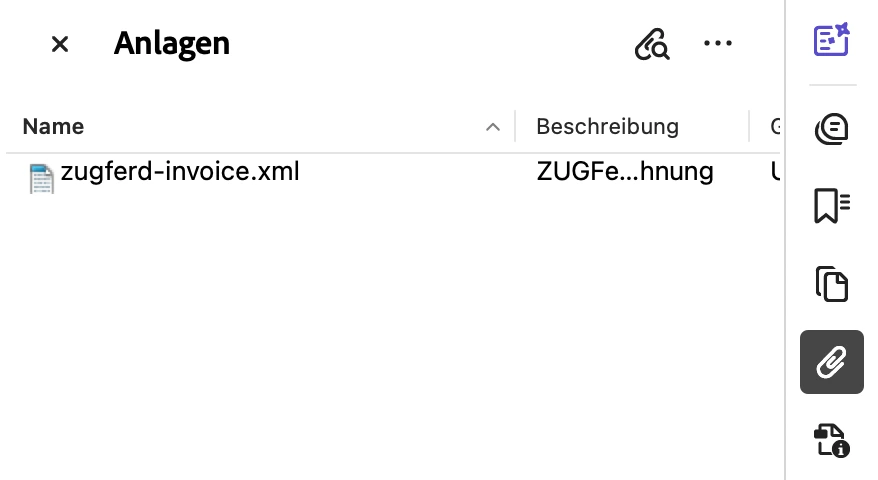
To check whether a PDF is a ZUGFeRD invoice, open it in a PDF reader and look at its attachments. If an XML file is attached, the invoice contains ZUGFeRD data. Whether it counts as a valid e-invoice then depends on its profile.
XRechnung is an e-invoice format that consists only of a clearly structured XML data set. It has no PDF or any other visual part, so people can hardly read it.
XRechnung was developed by KoSIT, the German Coordination Office for IT Standards, as the German version of the e-invoice. It meets all requirements of the European standard EN 16931. Since 2020, it has been the standard for invoices to public authorities in Germany.
The goal is an IT-supported process for sending, checking and processing invoices between different accounting systems. Like ZUGFeRD, XRechnung stores all invoice data in a defined schema at fixed places. The details of the issuer and the recipient therefore always sit in the same spot of the file. That allows different software systems to read and process invoices automatically, which saves time and reduces data entry errors.
You can send an XRechnung through a direct connection, through a third-party provider or through Peppol. Peppol is a network that makes it easier to exchange electronic documents, without media breaks and without changing systems.
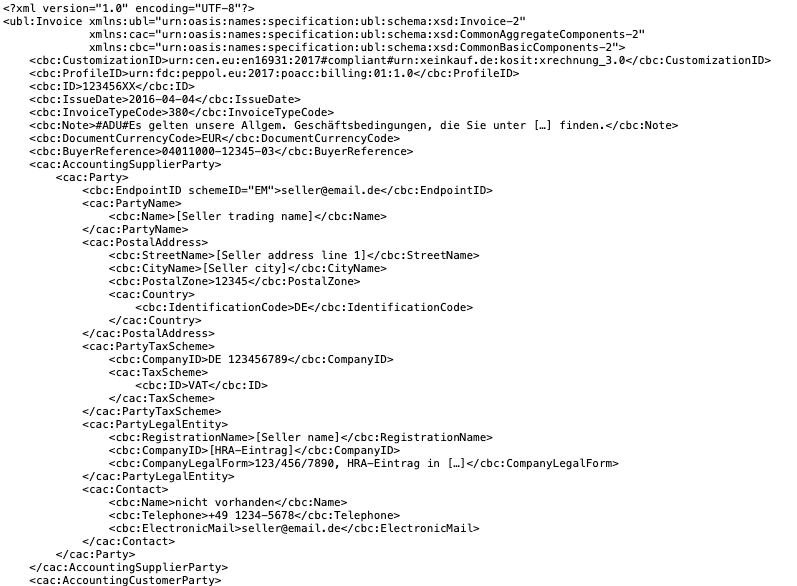
An XRechnung does not look like an invoice at all. It is a plain XML file with no layout, logo or table. If you open it in a text editor or a browser, you see lines of code instead of a document.
In this code, every piece of invoice data has its own label and its own fixed place. That includes the details of the issuer and the recipient, the invoice number, the date, the line items, the amounts and the tax. Software reads these labels and processes the data automatically. People, however, need a tool that turns the code into a readable invoice.
This is roughly what the data looks like:
Tax adviser Daniel Kiriakou summed up the practical problem in a sevdesk webinar:
"With an XRechnung, you only get a data set. You cannot read it, so from now on you need a tool to make visible what is in the invoice. What is in it, and what do I owe my supplier or service provider?"
Daniel Kiriakou, tax adviser
For you and your customers, this means one thing: to read and process an XRechnung, you need software. That can be e-invoicing software or a free e-invoice viewer (available in German: XRechnung Viewer).
In short, XRechnung is ideal for machine processing but not for human readers. It has been the standard for invoicing the federal government and public authorities since 2020.
Both formats meet the legal requirements, so the choice is yours. The easiest way to decide is to look at your customers and what they expect from an invoice.
Here is a side-by-side comparison of the key differences:
Tax adviser Daniel Kiriakou has a simple tip:
"Send ZUGFeRD. Whoever needs the XML file has it, and everyone else gets a nice PDF."
Daniel Kiriakou, tax adviser
The e-invoicing obligation applies in stages. The rules below cover invoices between businesses that are both based in Germany. Invoices to private customers (B2C) are not covered, so you do not have to issue e-invoices for them.
In practice, a plain PDF will no longer be enough in B2B once the transition period ends. A ZUGFeRD file with a valid profile still works, because it contains the structured XML data. Without a valid e-invoice, your customer can risk losing the input VAT deduction.
There are exceptions. For example, small businesses that use the German small business scheme (Kleinunternehmerregelung) do not have to issue e-invoices, but they still have to be able to receive them. Invoices up to €250 are also exempt.
If you want to turn an existing PDF invoice into an e-invoice, you can convert it with the right software.
Not as such. German law does not name a specific format. It requires an e-invoice: a structured electronic invoice that follows the European standard EN 16931 and that software can process automatically.
In practice, ZUGFeRD and XRechnung are the two formats in Germany that meet this standard. Other formats that comply with EN 16931 are possible in theory, but these two are the ones you will meet. You can choose either of them. Both are equally valid, and which one you use is up to you.
Two things are not optional:
If you invoice public authorities, check whether the authority prefers XRechnung.
With sevdesk, you can create both formats in a few clicks. From creating to archiving, we make e-invoicing as simple as possible. Whether your customers are businesses or public authorities, your invoices follow the current German legal standards.
Here is what you get:
With sevdesk, you are ready for the future of invoicing in Germany. Create your first e-invoice in ZUGFeRD or XRechnung format today.
ZUGFeRD is a hybrid e-invoice format that combines machine-readable XML data with a PDF, so people can read it without extra tools. XRechnung is a pure XML format, developed for invoices to public authorities, that needs software to be read.
If you invoice businesses and private customers, ZUGFeRD is usually the better choice. If you invoice mostly public authorities or very large organisations, XRechnung is the safer pick. Both meet the European standard EN 16931.
For B2B invoices, you are free to choose. Both formats meet the European standard EN 16931. If you invoice public authorities, the right choice can also depend on the authority and the federal state, so check their requirements first.
An XRechnung is a pure XML file that people can hardly read. A ZUGFeRD invoice also contains an XML file but adds a PDF, so people can read and process it too.
Germany is phasing in mandatory e-invoicing for B2B transactions between businesses based in Germany. Every business has had to be able to receive e-invoices since 1 January 2025. Issuing becomes mandatory step by step: from 2027 for businesses with a turnover above €800,000 and from 2028 for everyone else. These e-invoices must follow EN 16931, and in Germany the two main formats are ZUGFeRD and XRechnung. If you only invoice private customers, you do not have to issue e-invoices.
The German obligation applies to transactions between businesses established in Germany. For customers in other countries, the rules of those countries or your agreement with the customer apply.
For now, yes. Until 31 December 2026, you may still issue PDF and paper invoices. Businesses with a turnover of up to €800,000 in the previous year can keep doing so until 31 December 2027. From 1 January 2028, a plain PDF no longer counts as an e-invoice for B2B invoices in Germany. A ZUGFeRD file is still fine, because it contains the structured XML data.
Not in a useful way. An XRechnung is plain XML, so you can open it in a text editor, but you only see code. To read it as a normal invoice, you need e-invoicing software or an e-invoice viewer.
Use the EN 16931 profile (formerly COMFORT) for most invoices. BASIC and EXTENDED are valid too. MINIMUM and BASIC WL do not contain complete invoice data, so they do not count as e-invoices.